
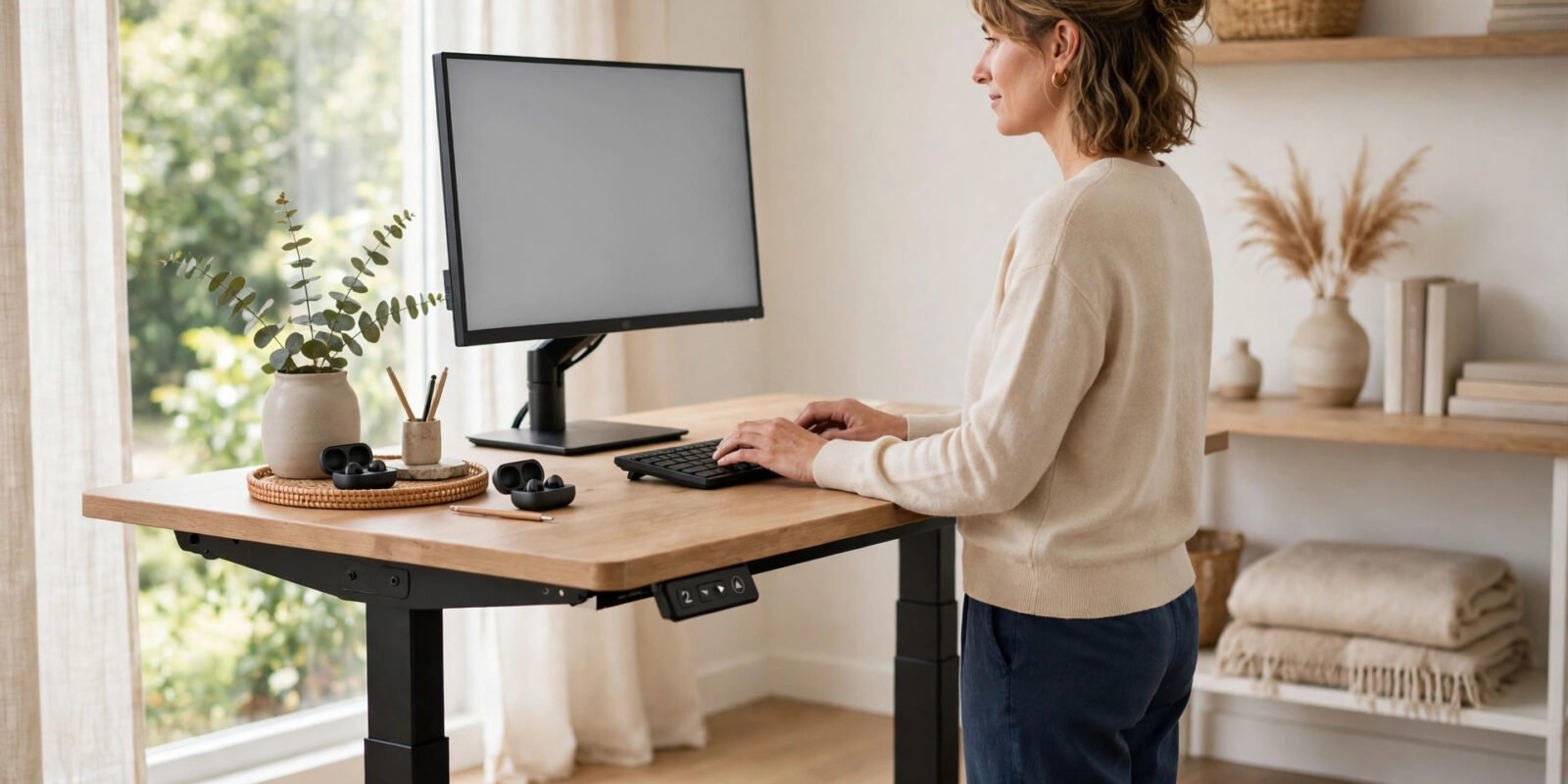
Most standing desks fail quietly. Not because the desk is bad, but because the setup is wrong. The screen sits too low, the desk sits too high, and the owner stands stiffly for three hours, aches, and quietly goes back to sitting all day. A good standing desk setup fixes all three problems at once — and it takes about fifteen minutes, not a weekend of tinkering.
Written by Md Masud Rana based on published expert sources. This article has not been professionally reviewed. See our sources below.
Here is the honest version of what a standing desk can do for you. It will not transform your health on its own, and it will not replace exercise. What it can do, when set up properly, is break up long stretches of sitting and ease the neck and shoulder ache that comes from a poorly placed screen. That is a smaller promise than the adverts make. It is also one the evidence actually supports.
This guide covers it in order: desk height, monitor position, keyboard and mouse placement, how long to stand, and the mistakes that send most people back to their chair.
Quick Answer
Set your standing desk so your elbows bend at about 90 degrees with your forearms parallel to the floor, the top of your monitor at or slightly below eye level about an arm’s length away, and your wrists straight while typing. Alternate between sitting and standing every 30 to 90 minutes rather than standing all day, wear supportive shoes or use an anti-fatigue mat, and shift your weight often. The goal is movement, not standing.
Contents
- Why Your Standing Desk Setup Is Really About Movement
- How Do You Set the Right Standing Desk Height?
- Where Should Your Monitor, Keyboard and Mouse Go?
- How Long Should You Stand Each Day?
- What Recent Research Shows
- Common Standing Desk Mistakes
- Accessories Worth Considering
- Final Recommendations
- Frequently Asked Questions
Why Your Standing Desk Setup Is Really About Movement
Picture the classic home-office scene. Someone buys a height-adjustable desk, full of good intentions, raises it on Monday morning, and stands there until lunch. By Wednesday their feet hurt, their lower back aches, and the desk is back at sitting height — where it stays. This is the most common standing desk story there is, and it happens because of a misunderstanding: the desk was never really about standing.
Canada’s occupational health authority, the Canadian Centre for Occupational Health and Safety (CCOHS), puts it plainly. A sit-stand desk is one that lets you alternate between sitting and standing by raising or lowering the work surface, and the point of that is to vary your body position more often. Standing too long, CCOHS warns, can itself lead to foot, knee, hip and back problems. The benefit is in the switching, not in the standing. CCOHS’s sit-stand desk guidance is the single most useful page in this whole guide, and most of the setup numbers below come from it.
That reframing changes how you should judge your own setup. A good day at a standing desk is not a day you stood for six hours. It is a day you never stayed in one position long enough to stiffen up. You sat for a focused task, stood for a call, walked to refill your water, sat again. Your body got variety, and your desk made that variety easy instead of awkward.
The two positions your desk must serve
Here is the practical consequence. Your desk has to be right in two positions, not one. Plenty of people carefully dial in their standing height and then slump at a sitting height that was never adjusted, or the other way round. Both positions deserve the same checklist: elbows near 90 degrees, wrists straight, screen at eye level, feet supported. If switching between them feels like a chore — cables snagging, the monitor wobbling — you will stop switching, and the desk stops helping.
So before you buy anything else, test the transition itself. Raise the desk, lower it, raise it again. Does the monitor stay put? Does anything fall off? Do you have to re-plug something? Fix those frictions first. A desk you actually adjust beats an expensive desk you leave in one position.
One more thing worth saying early. A standing desk is not a treatment for back pain, and it is not a weight-loss tool. Later in this guide we look at what the research actually shows, and the picture is more modest than the marketing. Knowing that now saves you from the disappointment that makes so many people abandon their desks entirely.
How Do You Set the Right Standing Desk Height?
Desk height is the foundation. Get it wrong and everything else — monitor position, wrist angle, shoulder tension — goes wrong with it. Get it right and the rest falls into place surprisingly easily.
Start with your elbows, not a number
Forget the height charts for a moment. Stand in front of your desk in the shoes you normally wear at it, relax your shoulders, and let your upper arms hang naturally at your sides. Bend your elbows to about 90 degrees, so your forearms are roughly parallel to the floor. The desk surface should sit at about your standing elbow height — in other words, where your hands naturally fall. That is the CCOHS rule, and it works for almost everybody, whatever their height, because it is based on your body rather than an average.
Now type a few sentences. Your forearms should stay roughly parallel to the floor, your wrists straight, and your shoulders relaxed. If your shoulders rise toward your ears, the desk is too high. If your wrists bend upward, the desk is too low.
Height charts do have a place, as a starting point. But body proportions vary enough that a chart number is never the final answer. Your elbows are. Write down your sitting and standing heights once you find them — most adjustable desks have memory presets for exactly this reason.
Set the sitting height properly too
Here is the step people skip. Sit down, adjust your chair so your feet rest flat on the floor (or on a footrest) with your knees at roughly a right angle, and then set the desk so your elbows are again at about 90 degrees. Our broader home office setup guide walks through chair and desk pairing in more detail.
One practical tip: set the sitting height first if you are starting from scratch. Most people spend more of the day seated, and a comfortable sitting position is your fallback. Then stand, find the standing height, and save both.
Small adjustments beat one perfect setting
Your body is not the same at 9am and 4pm. Feet swell slightly, muscles tire, and the height that felt perfect in the morning can feel a touch high by late afternoon. Nudge the desk up or down a centimetre or two when something feels off. Also remember what is under your feet: if you add a thick anti-fatigue mat, raise the desk slightly to compensate, since the elbow rule absorbs this automatically.
Where Should Your Monitor, Keyboard and Mouse Go?
With desk height sorted, the screen is the next thing to fix, and it is usually the thing causing the neck ache. A monitor that sits too low is the single most common setup fault in home offices, especially for laptop users.
Monitor height: top of the screen at eye level
The rule is simple and widely agreed. The top of your monitor should sit at or slightly below eye level, and the screen should be about an arm’s length away from you. Your line of sight then falls naturally somewhere between horizontal and slightly downward, which keeps your neck in a neutral position instead of bent forward for hours. CCOHS gives the same guidance for both sitting and standing: when you switch positions, the monitor height relative to your eyes should stay the same, which means the monitor must move with the desk.
This is where laptop-only setups fall apart. A laptop screen sits far below eye level, so you spend the day looking down. The fix is unglamorous but effective: raise the laptop on a stand or use an external monitor at the right height, and add a separate keyboard and mouse so your hands stay at elbow level while the screen stays at eye level.
Monitor distance and angle
About an arm’s length — roughly 50 to 75 centimetres for most people — is the usual guidance. If you find yourself leaning forward to read text, the answer is usually larger text, not a closer screen. Tilt the screen back very slightly so it faces your eyes squarely, and keep it directly in front of you rather than off to one side.
For two monitors, put the one you use most directly in front of you and angle the second one inward beside it. If you use both equally, centre the pair so neither forces a permanent turn.
Keyboard and mouse: same level, close in
Your keyboard and mouse belong on the same surface, at the same height, with your elbows close to your body. The mouse should sit beside the keyboard, not reaching out to the side, and not on a different level. CCOHS’s guidance for the standing position is to keep the keyboard and mouse aligned exactly as you would when sitting — same relative positions, just higher up.
Watch your wrists while you type. Straight and roughly parallel to the floor is the target. A keyboard tray can help here, because it lets you set the keyboard height independently of the monitor height. But a tray is a refinement, not a requirement — most people get most of the benefit just by setting the desk to elbow height and pulling the keyboard close.
Glare deserves a mention too. If your screen faces a window or a bright lamp, you will squint and lean without noticing why. Turn the desk so light comes from the side, and adjust brightness to match the room.
How Long Should You Stand Each Day?
This is the question everyone asks, and the honest answer is that there is no single magic number. Guidance varies, and the best advice is less a schedule than a principle: switch often, and let comfort set the pace.
What the guidance says
CCOHS notes that recommendations vary widely — from sitting for an hour and standing for five minutes, to switching every 20, 30, 45 or 60 minutes — and concludes that the key factor is to alternate position as needed. A practical starting point used by many ergonomics guides is to switch every 30 to 90 minutes, building toward a roughly even split over the day if that feels comfortable.
Start small. If you are new to standing at work, begin with short standing blocks — fifteen to thirty minutes at a time — a few times a day, and build up over a couple of weeks. Jumping straight to hours of standing is the fastest route to soreness and to giving up.
Build switching into tasks, not willpower
Willpower is a poor system. Habits tied to tasks work better. Try standing for phone and video calls, for reading, and for sorting email. Sit for deep writing or detailed work where you want to be settled. Stand when you return from a break, since you are already on your feet. Some people set a quiet timer; others just stand whenever they catch themselves fidgeting, which is actually a decent signal.
Breaks away from the desk still matter, whatever position you are in. Step away from the screen regularly, look into the distance to rest your eyes, walk around, stretch. A standing desk changes your posture, not your need for breaks. And the way you wind down after a screen-heavy day matters too — our bedtime routine guide covers the evening side of the same problem.
Signs you are standing too long
Your body will tell you, usually before you expect it. Aching feet, sore calves, a heavy feeling in the lower back, or the urge to lean on the desk are all signals to sit down. Leaning on the desk is particularly telling: it means your legs are tired and your posture has collapsed. Sit, rest, and stand again later.
Footwear matters more than people expect. Supportive shoes make a real difference, and standing in socks on a hard floor is a recipe for sore feet. An anti-fatigue mat helps by cushioning the floor and encouraging tiny ankle movements.
What Recent Research Shows
It is worth being straight about the evidence, because it is more modest than most standing desk marketing suggests. The strongest finding in the literature is also the least glamorous: sit-stand desks reliably reduce sitting time. Whether that reduction turns into better health is less certain.
The most careful summary comes from Cochrane, the independent research network known for systematic reviews. Its updated review of workplace interventions to reduce sitting looked at 34 studies with 3,397 participants, and found very low-quality evidence that sit-stand desk users sat between 84 and 116 minutes less per working day than people using conventional desks, with fewer sitting episodes lasting 30 minutes or longer. The same review graded the health benefits themselves as very uncertain, noting that the studies were mostly small and poorly designed. It also offered two reassuring findings: standing more did not produce harmful effects in the studies, and standing instead of sitting barely increases energy expenditure, so a sit-stand desk should not be bought as a weight-loss tool. Cochrane Canada’s summary of the review is refreshingly blunt about all of this.
That picture — less sitting, uncertain health gains, no evidence of harm when done sensibly — lines up with the broader research conversation. Some studies report less back and neck discomfort when workers alternate positions with a properly placed screen, and some report better energy and mood. Others find little or nothing. The honest summary is that a standing desk is a reasonable tool for breaking up sitting, not a proven health intervention.
What this means for your expectations
Set your expectations accordingly and you will probably keep using the desk. Expect less stiffness, a more varied day, and fewer of those afternoons where you realise you have not moved since lunch. Do not expect weight loss, a cured back, or a transformed energy level. If you have an existing back or joint problem, talk to a qualified health professional about what is appropriate for you rather than trusting a desk to fix it — the desk is furniture, and furniture has limits.
There is also a useful counterpoint worth knowing. Research on prolonged standing in general has found that standing still for long periods carries its own circulatory and musculoskeletal downsides. That is another reason the alternating pattern matters so much. The enemy was never sitting as such; it was staying still.
Common Standing Desk Mistakes
Most standing desk problems come from a short list of errors. Check yourself against each one — fixing even two of them usually transforms how the desk feels.
1. Standing all day
The classic error. Standing for hours without a break trades one static posture for another, and your feet, knees and lower back will eventually object. The fix is the alternating pattern described above: sit, stand, move, repeat. If you catch yourself standing because you feel you “should”, sit down. The desk serves you, not the other way round.
2. A monitor that is too low
Looking down at a screen for hours strains the neck and upper back, and it is the most common cause of standing desk discomfort. The fix is to raise the screen so its top sits at or slightly below eye level — a monitor arm or stand does this cleanly, and for laptops, an external monitor or a laptop stand plus separate keyboard is the real solution.
3. Setting the desk by guesswork
Eyeballing the height usually leaves the desk a few centimetres too high, which pushes the shoulders up and bends the wrists. The fix is the elbow rule: stand relaxed, bend your elbows to 90 degrees, and set the surface to meet your hands. Then save the setting so you never have to guess again.
4. Locking your knees and standing still
Standing like a statue is tiring and unhelpful. Keep your knees soft, not locked, shift your weight from foot to foot, use a footrest, take a step back now and then. Small movements are the whole point — a standing desk used rigidly is barely better than a chair used rigidly.
5. Ignoring the sitting position
Many people perfect their standing setup and leave their sitting setup terrible, then wonder why half their day still hurts. The fix is to apply the same checklist seated: chair height, feet supported, elbows at 90 degrees, screen at eye level. Your chair matters here, and our guide to ergonomic office chairs covers what to look for if your current chair is fighting you.
6. Bad footwear and hard floors
Standing in unsupportive shoes, or in socks on tile or wood, punishes your feet quickly. The fix is simple: supportive shoes at the desk, and an anti-fatigue mat if your floor is hard. Both are cheap compared with the desk itself, and both make longer standing blocks genuinely comfortable.
7. Cables and clutter that fight the adjustment
If raising the desk yanks a cable or topples a mug, you will stop raising it. The fix is cable management with enough slack for the full height range, and a clear surface policy: everything on the desk should be able to ride up and down safely. CCOHS makes the same point — layout and cabling should never make adjusting the desk difficult.
8. Expecting the desk to replace exercise
A standing desk burns only slightly more energy than sitting, and Cochrane is explicit that it should not be expected to help with weight loss. The fix is to keep the desk in its proper place: one tool for breaking up sitting, alongside walking, stretching and whatever exercise you actually enjoy. The desk supports an active day; it does not create one.
Accessories Worth Considering
You do not need much beyond the desk itself, and it is easy to overspend here. These are the accessories that genuinely earn their place, described as categories rather than specific products — because the category is what matters, not the brand.
Monitor arm or stand
The single most useful accessory, because it solves the most common problem: screen height. An adjustable arm lets you set the screen exactly at eye level and move it between sitting and standing positions. If your monitor’s fixed stand cannot reach eye level, this is the first thing to fix.
Anti-fatigue mat
A cushioned mat reduces pressure on feet, knees and lower back, and encourages the small ankle movements that keep circulation going. It matters most on hard floors. Remember to nudge the desk height up slightly to account for the mat’s thickness, and keep the elbow rule as your check.
Footrest
A low footrest lets you alternate feet while standing, which shifts your weight and rests one leg at a time. It is a small, cheap addition that makes standing noticeably more sustainable. A sturdy box or step does the same job.
Keyboard tray
Worth considering if your keyboard height and monitor height disagree — for example, if your desk cannot go low enough for comfortable typing while the screen is at eye level. A tray separates the two heights. It is a refinement, though, not a starting point: most people should set the desk to elbow height first and only add a tray if a real conflict remains.
What you probably do not need
Balance boards, treadmill attachments and elaborate under-desk exercisers all have their fans, but they solve problems most people do not have. Get the height, screen and routine right first, and add extras later if you still want more movement.
Final Recommendations
- Set height by your elbows. Standing and sitting, elbows at about 90 degrees, forearms parallel to the floor, wrists straight. Save both heights as presets.
- Raise the screen to eye level. Top of the monitor at or slightly below eye level, about an arm’s length away, directly in front of you. Laptop users: add a stand or external monitor and a separate keyboard.
- Keep the mouse close. Same level as the keyboard, beside it, with elbows near your body. No reaching, no twisting.
- Alternate every 30 to 90 minutes. Build up gradually from short standing blocks. Tie standing to tasks like calls and reading rather than to willpower.
- Move while you stand. Soft knees, shifting weight, a footrest, short walks. Stillness is the problem the desk is meant to solve.
- Sort your feet. Supportive shoes and, on hard floors, an anti-fatigue mat. Comfort underfoot decides whether you keep standing.
- Fix the sitting half too. A good standing setup with a bad sitting setup is only half a solution. Apply the same checklist to your chair.
- Keep expectations honest. Expect less stiffness and a more varied day, not weight loss or a cured back. For persistent pain, see a qualified health professional.
A standing desk, set up well, is a quiet upgrade to your working day rather than a dramatic one. The screen stops hurting your neck. The afternoon stops feeling like concrete. You move a little more, without thinking about it much. That is the whole prize, and it is worth having.
This content is for educational purposes only and does not replace professional medical advice. Always consult a qualified health professional before making health decisions.
Frequently Asked Questions
There is no single correct number, because it depends on your body. Stand in the shoes you normally wear, relax your shoulders, and bend your elbows to about 90 degrees with your forearms parallel to the floor. Set the desk surface to meet your hands at that height. If your shoulders rise while typing, the desk is too high; if your wrists bend upward, it is too low. Save both your sitting and standing heights once you find them.
The top of your monitor should sit at or slightly below eye level, about an arm's length away, whether you are sitting or standing. This keeps your neck neutral instead of bent forward. Laptop users should raise the screen with a stand or use an external monitor, plus a separate keyboard and mouse, because a laptop's built-in screen sits far too low on its own.
There is no official daily total to hit. Guidance varies, but the consistent advice is to alternate between sitting and standing every 30 to 90 minutes rather than standing for hours at a stretch. Beginners should start with short standing blocks of 15 to 30 minutes a few times a day and build up over a couple of weeks, letting comfort, not a timer, set the pace.
No. Trading one static posture for another just moves the strain somewhere else — feet, knees and lower back instead of hips and neck. Research on prolonged standing finds its own downsides, and ergonomics guidance is clear that the benefit comes from varying your position. The healthiest pattern is a mix: sit, stand, walk, and change position often throughout the day.
The evidence is mixed and modest. Some studies find less neck, shoulder and back discomfort when workers alternate positions with a properly set up screen, but systematic reviews grade the overall health benefits as very uncertain. A standing desk may ease the stiffness that comes from sitting still all day, but it is not a treatment for an existing back problem. Persistent or worsening pain deserves a qualified health professional, not a furniture purchase.
On a hard floor, yes, it is worth having. A cushioned mat reduces pressure on your feet, knees and lower back and encourages small ankle movements that keep circulation going. On carpet it matters less. Either way, wear supportive shoes rather than standing in socks, and remember to raise the desk slightly to allow for the mat's thickness, keeping your elbows at 90 degrees.
Yes, but not with the laptop flat on the desk. A laptop's screen and keyboard are attached, so you cannot have both at the right height at once — the screen ends up far below eye level and your neck pays for it. Raise the laptop on a stand or connect an external monitor at eye level, and use a separate keyboard and mouse at elbow height. That one change fixes the most common laptop posture problem.
Usually one of three things: standing for too long without a break, unsupportive footwear or a hard floor, or standing rigidly with locked knees. Sit down and rest, then shorten your standing blocks and build up gradually. Supportive shoes and an anti-fatigue mat help, as does shifting your weight, using a footrest, and keeping your knees soft. If foot pain persists, get it checked rather than pushing through.
Conclusion
A good standing desk setup is not complicated, and it is not expensive beyond the desk itself. Elbows at 90 degrees. Screen at eye level. Mouse close. Switch positions often. Move while you stand. That is most of it, and the people who get those five things right are the ones still happily using their desks a year later.
The people who give up usually made one of the familiar mistakes: standing all day, a screen that sat too low, a height set by guesswork, or expectations the evidence never supported. All of those are fixable, and most of them are fixable in an afternoon. Start with the elbow rule, raise your screen, and try standing for your next phone call instead of your whole morning.
References
- Canadian Centre for Occupational Health and Safety — Office Ergonomics: Sit/Stand Desk — CCOHS — https://www.ccohs.ca/oshanswers/ergonomics/office/sit_stand_desk.html
- Cochrane Canada — Featured Review: Workplace interventions for reducing time spent sitting at work — Cochrane — https://canada.cochrane.org/news/featured-review-workplace-interventions-reducing-time-spent-sitting-work
- iMovR — A Guide to Standing Desk Ergonomics — iMovR — https://www.imovr.com/pages/standing-desk-ergonomics